⚡ 24/7 Emergency Data Recovery — Engineer responds in 15–20 min · 1-888-749-3786
SSD and NVMe drives

SSD & NVMe Recovery — Chip-Level Expertise

If your SSD has stopped being detected, shows a capacity of zero, or your system won't boot — your data is likely still there. Our engineers recover data directly from NAND flash chips when traditional methods fail.

96%
Success Rate
14+
Years Experience
24/7
Available
$450
Upfront · Credited
15-20 Min Response
Real engineer, never a bot
No Data, No Charge
On qualifying cases
Free UPS Both Ways
Fully insured in transit
Privacy-First Lab
PIPEDA compliant
$450 Assessment Fee
Upfront · credited toward recovery

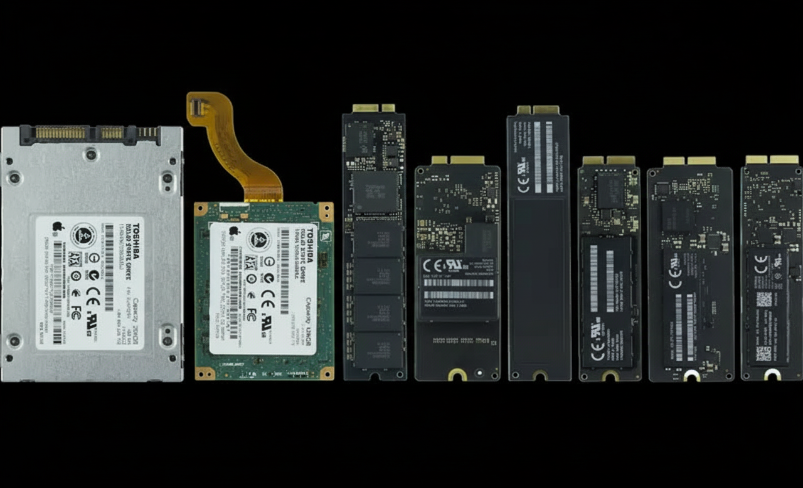
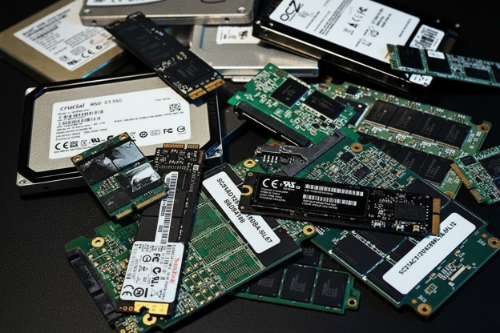
Every SSD Form Factor. Every Controller.

From consumer laptops to enterprise servers, we recover data from all solid-state drive architectures — regardless of manufacturer, capacity, or interface type.

M.2 NVMe

The fastest consumer and enterprise SSD interface. Samsung 970/980/990, WD Black, Crucial P-series, Intel 670p, and all PCIe Gen 3/4/5 NVMe drives. Controller failures and firmware corruption are the most common failure modes.

M.2 SATA

Same M.2 form factor but using the SATA protocol instead of NVMe. Found in many budget laptops and ultrabooks. Different controller architecture requires different recovery approach than NVMe variants — our tools handle both.

2.5" SATA SSD

The most common SSD form factor in desktops and older laptops. Samsung 860/870 EVO, Crucial MX500, WD Blue, Kingston A400. Handles SATA III interface at up to 550 MB/s. We recover from controller failure, bad blocks, and firmware bugs.

mSATA

Mini-SATA drives used in older ultrabooks, industrial equipment, and embedded systems. Compact form factor with unique connector pinout. We have the adapters and tools to diagnose and recover data from all mSATA drives.

PCIe Add-in Card

Enterprise and high-performance PCIe SSDs that plug directly into PCIe slots. Intel Optane, Samsung PM series, and workstation drives. Higher complexity recovery due to enterprise-grade controllers and larger NAND arrays.

Enterprise NVMe

U.2 and U.3 form factor SSDs used in servers and data centres. Samsung PM1733, Intel D7-P5600, Micron 9400. Complex multi-die architectures with enterprise firmware. We have the tools and experience to handle enterprise-grade SSD recovery.

NAND Flash Recovery Requires a Different Approach

Unlike hard drives with spinning platters, SSDs store data in NAND flash memory chips controlled by complex firmware. When that firmware fails, standard software tools cannot reach your data. Our engineers work at the chip level to bypass the controller and read raw NAND directly.

Why SSDs Fail — And What We See in the Lab

SSDs fail differently than hard drives. There are no moving parts to break, but firmware corruption, controller failure, and NAND wear are just as devastating to your data. Here are the most common SSD failures we recover from.

Firmware Corruption

The SSD's internal firmware manages how data is written, read, and organized across NAND chips. When firmware becomes corrupted — due to a failed update, power loss during a write operation, or a manufacturing defect — the drive may become completely unresponsive. The data remains intact on the NAND, but the controller can no longer access it. Our engineers bypass the controller to read data directly from the chips.

Controller Failure

The SSD controller is the brain of the drive — it manages all read/write operations, error correction, wear leveling, and garbage collection. When a controller chip fails due to a power surge, overheating, or component degradation, the SSD appears dead. Your operating system sees nothing. We use specialized equipment to communicate directly with the NAND flash chips, bypassing the failed controller entirely.

NAND Wear & Bad Blocks

Every NAND flash cell has a limited number of write cycles — typically 1,000 to 100,000 depending on the technology (SLC, MLC, TLC, QLC). As cells wear out, the drive develops bad blocks. Once enough blocks fail, the SSD either becomes read-only, shows reduced capacity, or stops functioning entirely. We can often recover data from worn NAND by reconstructing the data map and applying advanced error correction.

Deleted Partition / Formatting

Accidentally deleted your partition table, formatted the wrong drive, or lost your data during an operating system reinstallation? If TRIM has not yet erased the underlying blocks, your data may still be recoverable. Time is critical — the longer the SSD remains powered on after deletion, the more likely TRIM will zero out the freed blocks. Power off and contact us immediately.

Power Surge / Electrical Damage

A sudden power surge or unstable power supply can burn out SSD controller chips, voltage regulators, or capacitors. This is especially common with cheap power supplies, unprotected power strips, and lightning strikes. The NAND flash chips themselves are often undamaged — the data is still there. We assess the damage, repair or bypass the failed components, and recover your data.

Why SSD Recovery Is More Complex Than Hard Drive Recovery

Hard drive recovery follows a relatively well-understood process: open the drive in a cleanroom, repair or replace the heads, image the platters, and reconstruct the data. The data on a hard drive platter is stored sequentially in a way that mirrors the logical file system. SSD recovery is fundamentally different.

SSDs scatter your data across dozens or hundreds of NAND flash chips using complex algorithms managed by the drive's controller firmware. Wear leveling constantly moves data between cells to distribute write wear evenly. Garbage collection reorganizes free space in the background. The physical location of your data on the NAND bears almost no resemblance to its logical position in your file system.

This means that even after successfully reading the raw NAND chips, our engineers must reconstruct the drive's translation layer — the firmware mapping table that tells the controller where each piece of data is stored. Without this map, the raw data is like a massive jigsaw puzzle with no picture on the box. Our proprietary tools and 14+ years of experience allow us to reconstruct these maps and recover your complete file system.

This complexity is why SSD recovery can sometimes cost more than hard drive recovery. It requires specialized equipment, deeper expertise, and more engineering time. But the success rate speaks for itself: we recover data from SSDs that other labs declare unrecoverable.

The TRIM Command: Why Every Second Counts After SSD Data Loss

Is my data gone? That is the first question we hear from every SSD recovery client. The answer depends largely on one thing: whether TRIM has run since the data was lost.

TRIM is a command that modern operating systems send to SSDs to tell them which data blocks are no longer in use. When you delete a file on a hard drive, the data stays on the platter until it is overwritten. When you delete a file on an SSD, the operating system sends a TRIM command that tells the drive to erase those blocks — and the SSD can execute that erasure almost immediately in the background.

Once TRIM has erased a block, that data is gone permanently. No lab in the world can recover data from a TRIMmed NAND cell. However, TRIM does not always run instantly. Some drives queue TRIM operations. Some operating systems batch TRIM commands. External SSDs connected via USB often do not support TRIM at all.

This is why we tell every client the same thing: power off your SSD immediately after data loss. Do not attempt to use recovery software — running any software on the drive can trigger additional TRIM operations. Do not restart your computer. Unplug the drive, or shut down the system, and call us at 1-888-749-3786. We will walk you through the safest way to ship your drive to our lab.

What NOT to Do After SSD Data Loss

  • Do not run data recovery software on the SSD — it triggers TRIM and additional writes
  • Do not keep the SSD powered on — background garbage collection can erase data
  • Do not attempt to reinstall your operating system on the same drive
  • Do not open the SSD or attempt to resolder components yourself
  • Do not repeatedly power the drive on and off — each boot attempt can cause further firmware damage
SSD data recovery showing NAND flash chips under microscope

Why SSD Recovery Is Different

When an SSD arrives at our London, Ontario lab, the first thing our engineers determine is whether the failure is logical (firmware, file system) or physical (controller, NAND damage). This distinction determines the entire recovery path.

For firmware failures, we use manufacturer-specific tools to repair or bypass the damaged firmware and access the data through the drive's native interface. For controller failures, we desolder the NAND flash chips and read them individually using specialized programmers — a process called chip-off recovery.

The raw data from the NAND chips must then be reassembled. SSD controllers use proprietary data scrambling, XOR patterns, and page mapping that vary by manufacturer and model. Our engineers reverse-engineer these patterns using our library of controller firmware — built over 14 years and thousands of SSD recoveries.

NAND flash chip-off for dead controllers
Firmware repair for corrupted translation tables
TRIM-aware imaging to preserve remaining data
XOR and data scrambling pattern reconstruction
ISO Class 100 cleanroom environment
Ship it. We diagnose it. Your data comes back. Five steps — complete transparency.

01

Contact Us

Call 1-888-749-3786 or submit your case online. A real engineer responds in 15-20 minutes to discuss your SSD failure and guide you through safe handling. We will determine the best recovery path before your drive ever leaves your hands.

02

Free Prepaid Shipping

We send you a free prepaid UPS shipping label. Your SSD is fully insured in transit — both directions. Pack it securely (we provide instructions) and drop it off at any UPS location. Most devices arrive at our London, ON lab within 1-2 business days.

03

Lab Assessment

Our engineers perform a comprehensive diagnostic in our ISO Class 100 cleanroom. We identify the exact failure — firmware, controller, NAND wear — and determine what data is recoverable. You receive a detailed report and a complete recovery quote.

$450 USD upfront · credited toward recovery
04

Recovery Process

Once approved, our engineers execute the recovery. For firmware failures, we repair the translation tables. For controller failures, we perform NAND chip-off and data reconstruction. You are updated throughout the process — no guessing, no silence.

05

Data Returned

We send you a full recovered file list for verification before shipping. Your data is returned on an encrypted external drive or via secure digital transfer. All copies are deleted from our systems upon your confirmation of receipt.

How Pricing Works
Your $450 assessment fee is credited in full toward recovery.
The assessment fee covers the real cost of SSD diagnostics performed by trained engineers using specialized NAND reading equipment. If you proceed with recovery, the full $450 is credited toward your total recovery cost. Backed by our No Data No Charge guarantee on qualifying cases — if we cannot recover your data, you receive a full refund.
Full $450 credited toward recovery cost
$450
Assessment Fee · Credited
Our Guarantee

Transparent pricing. Full protection. No Data No Charge on qualifying cases.

SSD recovery is complex and requires specialized tools that most labs do not have. We invest in this equipment so you do not have to worry about whether your data is in capable hands. Every dollar of your assessment fee is credited toward recovery, and our guarantee protects your investment.

  • $450 USD assessment fee — paid upfront, fully credited toward recovery
  • No Data No Charge guarantee on qualifying cases
  • Full recovered file list sent before data is shipped
  • Free prepaid UPS shipping both ways — fully insured
  • All data deleted from our systems upon your confirmation
Start Your SSD Recovery →

SSD & NVMe Recovery FAQ

Yes, in most cases. Even when an SSD is completely unresponsive or not detected by your computer, the NAND flash memory chips still hold your data. The controller or firmware has failed, but the data itself remains on the chips. Our engineers use specialized tools to read the raw NAND chips directly, bypassing the failed controller. We recover data from dead SSDs with a 96% success rate. The key is acting fast — power off the drive and contact us at 1-888-749-3786.
TRIM can make recovery more difficult, but not always impossible. When TRIM runs, it tells the SSD to erase blocks that are no longer in use — which can permanently destroy deleted data. However, TRIM does not always execute immediately. Some drives queue TRIM operations, some operating systems batch TRIM commands, and external SSDs connected via USB often do not support TRIM at all. The critical factor is time: power off your SSD immediately after data loss to prevent TRIM from running. Do not run recovery software — it can trigger additional TRIM operations.
NVMe and SATA SSDs use different interfaces, controllers, and firmware architectures — which means different recovery techniques. NVMe drives communicate through the PCIe bus and often have more complex controller architectures with higher channel counts. SATA SSDs use the older AHCI protocol with different command sets. Both store data on NAND flash chips, but the firmware structures, encryption methods, and data mapping differ significantly. Our lab has the specialized tools for both interfaces, and our engineers are trained on the specific controller architectures from Samsung, Western Digital, Crucial, Intel, and other manufacturers.
SSD recovery begins with a $450 USD assessment fee paid upfront. This fee covers comprehensive diagnostics performed by our engineers in our ISO Class 100 cleanroom. The full $450 is credited toward the total recovery cost if you proceed. Final pricing depends on the complexity of the failure, the drive capacity, and the level of NAND damage. We provide a complete quote after assessment — no hidden fees, no surprises. Our No Data No Charge guarantee on qualifying cases means you are protected if recovery is not possible.
Standard SSD recovery typically takes 3 to 7 business days after the drive arrives at our lab. Simple firmware repairs may complete faster. Complex cases involving NAND chip-off, data reconstruction, or severe firmware corruption may take 7 to 14 business days. Emergency priority service is available for time-critical situations — call 1-888-749-3786 and we will expedite your case. We keep you updated at every stage of the recovery process.
The single most important thing: power off the SSD immediately. Do not attempt to use data recovery software — this triggers additional writes and TRIM operations that can permanently erase your data. Do not keep restarting your computer hoping the drive will appear. Do not open the SSD enclosure or attempt to resolder components. Do not take it to a general computer repair shop — most do not have the tools for SSD recovery and may cause additional damage. Power it off, call us, and we will guide you through safe handling and shipping.
If you have the encryption key or password, yes. Many modern SSDs use AES-256 hardware encryption by default — the data is encrypted as it is written to NAND. If the controller fails but the encryption key is stored in the drive's firmware area, we may be able to extract it as part of the recovery process. Without the key, recovery of readable data is typically not possible due to the strength of modern encryption. Contact us with your specific situation and we will provide an honest assessment.
Yes. We recover data from Apple proprietary SSDs found in MacBook Air, MacBook Pro, iMac, and Mac Pro models — including those with T2 security chips and Apple Silicon (M1/M2/M3/M4). Apple uses custom NVMe controllers and unique firmware that most recovery labs cannot work with. Our engineers have the specialized tools and experience to handle Apple's SSD architectures. Contact us with your Mac model and we will advise on the best recovery approach.

SSD stopped being detected?

Power it off immediately. Do not run recovery software. Our engineers respond in 15-20 minutes and will guide you through safe handling. Every minute the drive stays powered on, TRIM may be erasing your data.

Start Emergency SSD Recovery →

Independent data recovery laboratory. Data Recovery Group is not affiliated with Samsung, Western Digital, Crucial, Intel, Kingston, Micron, Apple, or any other device manufacturer or OEM. All brand names, product names, and trademarks referenced on this page are the property of their respective owners and are used solely for identification purposes. References to these brands do not imply endorsement or affiliation.