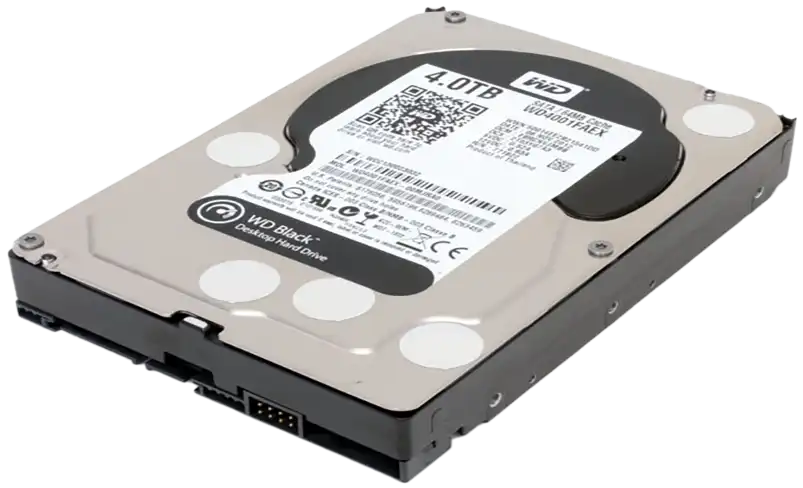
Clicking, beeping, grinding, not detected, dropped, or water damaged — if your data is on the platters, we can get it back. Our ISO Class 100 cleanroom engineers have spent 14+ years recovering drives that other labs turned away.
Every hard drive failure tells a story. These are the most common symptoms we recover from — and the signals that mean you should stop using the drive immediately and call us.
A rhythmic clicking sound indicates the read/write heads are failing or have lost alignment. The heads are repeatedly trying to calibrate and failing. Power off the drive immediately — each click cycle risks scratching the platter surface and destroying data permanently.
A beeping drive typically means the spindle motor is seized — the platters cannot spin. This is often caused by a head crash where the heads have landed on the platter surface, or by a motor bearing failure. Recovery requires opening the drive in a cleanroom to free the platters and transplant them or repair the motor assembly.
When your drive is not recognized by BIOS, Disk Management, or your operating system, it often indicates a PCB failure, firmware corruption, or severe head damage. The drive may spin normally but simply cannot communicate with your system. Our engineers diagnose the exact failure point and restore communication to access your data.
Grinding sounds are among the most serious symptoms — they indicate the read/write heads are in direct contact with the platter surface. This is an active head crash. Every second the drive remains powered on, the heads are physically scraping data off the platters. Power off immediately and do not attempt to power on again. Call us at 1-888-749-3786.
A hard drive dropped while powered on almost always suffers a head crash — the impact forces the read/write heads into the platter surface. Even a drop from desk height can cause catastrophic damage. Drives dropped while powered off may have dislodged heads, damaged spindle bearings, or cracked platters. Do not power on a dropped drive — bring it directly to our cleanroom for assessment.
Water, flooding, and fire expose drive internals to contaminants that corrode the platters and heads. Time is critical — the longer contaminants sit on the platter surface, the more data is destroyed. Do not attempt to dry, clean, or power on a water-damaged drive. Ship it to us sealed in a plastic bag. Our cleanroom environment allows us to clean and recover platters that would otherwise be written off.
Every hard drive recovery begins here — a particle-free environment where a single speck of dust can destroy a platter. Our Tier 3 lab in London, Ontario is one of the most controlled recovery environments in Canada. Fewer than 100 airborne particles per cubic foot. The same standard used in semiconductor manufacturing and surgical operating rooms.
Hard drives are precision mechanical devices with moving parts spinning at thousands of RPM. Understanding why they fail helps you know what to do — and what not to do — when yours stops working.
The most common category of hard drive failure. Read/write head crashes, spindle motor seizures, bearing failures, and actuator arm malfunctions all fall under mechanical failure. These are the drives that click, beep, grind, or refuse to spin. Recovery requires opening the drive inside an ISO Class 100 cleanroom, replacing the failed components with precision-matched donor parts, and imaging the platters sector by sector. Our engineers have 14+ years of experience performing these surgeries on thousands of drives from every major manufacturer.
The drive hardware works perfectly, but the data is inaccessible. Corrupted file system tables, accidental formatting, deleted partitions, virus or ransomware damage, and operating system failures all cause logical failure. The data is still physically present on the platters — the drive has simply lost the map that tells it where each file lives. Recovery involves creating a forensic image of the drive and reconstructing the file system to locate and extract your files intact.
Every hard drive runs its own internal operating system — the firmware. When firmware modules become corrupted (from power surges, bad sectors in the service area, or manufacturing defects), the drive may spin up but fail to identify itself, report the wrong capacity, or become completely unresponsive. Firmware repair requires specialized tools that can communicate directly with the drive's service area — equipment that most IT departments and general repair shops do not have. Our lab maintains firmware databases for every major drive family.
Drops, impacts, water exposure, fire, power surges, and extreme temperatures cause physical damage that ranges from minor PCB component failure to catastrophic platter destruction. Water-damaged drives require immediate attention — corrosion begins within hours and accelerates over days. Fire-damaged drives may have warped enclosures, melted components, and heat-stressed platters. Our cleanroom allows us to carefully disassemble, clean, and assess physically damaged drives under controlled conditions that prevent further contamination.
Our engineers examine every platter surface, replace damaged read/write heads, and rebuild the mechanical assembly needed to extract your data — work that requires years of training and equipment most labs simply do not have. Every head swap, every motor transplant, every firmware repair is performed under laminar airflow in our ISO Class 100 cleanroom.
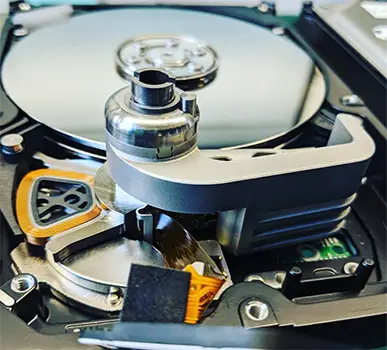
When our engineers open a hard drive inside the cleanroom, they examine every component that can cause failure. Understanding what is inside your drive helps explain why cleanroom conditions are non-negotiable — and why the $450 assessment fee covers real, precision lab work.
The platters are thin, polished discs coated with a magnetic recording layer. Your data lives here — billions of magnetic transitions representing every file, photo, and document you have ever saved. Even a fingerprint or a single dust particle on the platter surface can cause permanent data loss.
See how our engineers approach hard drive recovery — from initial assessment through data extraction and delivery.
Request a free prepaid UPS shipping label. Your drive is fully insured in transit — both ways. Pack it securely, attach the label, and drop it off at any UPS location. Most drives arrive at our lab within 1–2 business days anywhere in the US or Canada.
Our engineers perform a thorough diagnostic inside our ISO Class 100 cleanroom. We identify the exact failure, assess platter condition, determine recoverability, and provide a detailed report with a fixed recovery quote.
You receive a detailed report explaining exactly what failed, what we found on the platters, and a fixed-price recovery quote. No surprises. You decide whether to proceed — and your $450 assessment fee is credited in full toward the recovery cost.
Our engineers execute the recovery — replacing heads, repairing firmware, imaging platters, or reconstructing file systems as needed. The full recovery process is performed inside our cleanroom under controlled conditions. We keep you updated at every stage.
We send you a full recovered file list for verification. Your data is returned on an encrypted external drive or via secure digital transfer — whichever you prefer. All copies are deleted from our systems upon confirmation of receipt.
Our cleanroom maintains donor parts and firmware databases for all major hard drive families. Regardless of brand, model, or age — if the data is on the platters, we can recover it.
We believe in transparency. You know the cost before any work begins, and every dollar of your assessment fee is credited toward your recovery. Our No Data No Charge guarantee on qualifying cases means your investment is always protected.
Yes. Clicking is one of the most common symptoms we recover from. It usually indicates a failed or damaged read/write head assembly. Our engineers replace the heads inside our ISO Class 100 cleanroom using donor parts matched to your exact drive model, then image the platters to extract your data. We have a 96% success rate on clicking drive recoveries. The most important thing you can do is power the drive off immediately — continued use causes the damaged heads to scratch the platter surfaces, which can make recovery significantly harder or even impossible.
Hard drive recovery begins with a $450 USD assessment fee paid upfront. This covers a comprehensive diagnostic inside our ISO Class 100 cleanroom performed by trained engineers — not a software scan. If you proceed with recovery, the full $450 is credited toward your total recovery cost. The total cost depends on the type and severity of the failure. After assessment, we provide a detailed report and fixed quote before any recovery work begins. Backed by our No Data No Charge guarantee on qualifying cases — if we cannot recover your data, you receive a full refund.
Standard hard drive recovery typically takes 5 to 10 business days from the time your drive arrives at our lab. This includes a thorough assessment, parts sourcing if needed, the recovery process itself, and quality verification of the recovered files. Emergency cases can be expedited — call our 24/7 line at 1-888-749-3786 for time-sensitive situations. We provide regular status updates throughout the entire process.
Hard drive platters spin at 5,400 to 15,000 RPM with read/write heads floating just nanometers above the surface. A single particle of dust — invisible to the naked eye — is large enough to cause a head crash that destroys data permanently. Our ISO Class 100 cleanroom maintains fewer than 100 airborne particles per cubic foot, the same standard used in semiconductor manufacturing. Opening a hard drive outside this environment risks contaminating the platters and making recovery impossible. This is why DIY recovery attempts and non-cleanroom labs frequently cause irreversible damage.
Our overall success rate is 96% across all hard drive recovery cases. This includes mechanical failures (clicking, beeping, grinding), logical failures (corrupted file systems, accidental deletion, formatting), firmware corruption, and physical damage from drops, water, or fire. Success depends on the condition of the platters — as long as the platter surfaces are not severely scored or degraded, recovery is almost always possible. Drives that have been opened outside a cleanroom or subjected to repeated power cycles after failure have lower recovery rates, which is why we strongly advise powering off and contacting us immediately.
Do not continue powering on the drive — especially if it is clicking, grinding, or beeping. Every additional power cycle risks further platter damage. Do not open the drive yourself — even in a "clean" home environment, airborne particles will contaminate the platters instantly. Do not attempt DIY recovery software on a physically failing drive — this forces the damaged heads to drag across the platter surface. Do not put the drive in a freezer — this is a myth that causes condensation damage and corrosion. Do not shake or tap the drive — this can dislodge head debris onto the platter. Power it off, keep it in a safe place, and contact our engineers at 1-888-749-3786.
Yes. All data on a traditional hard drive is stored magnetically on the platter surfaces — thin aluminum or glass discs coated with a magnetic recording layer. The read/write heads float nanometers above these platters to read and write data. When a drive fails mechanically, the data on the platters is usually still intact. Our recovery process involves replacing the damaged mechanical components to regain access to the platters, then creating a sector-by-sector image of the drive to reconstruct your files. As long as the platter surfaces have not been physically scratched or degraded, recovery is possible.
Yes, but with an important caveat: we can recover the encrypted data from the platters, but you will need your encryption key or password to decrypt the files after recovery. Hardware-level encryption (like BitLocker, FileVault, or self-encrypting drives) means the data is stored in encrypted form on the platters. We recover the raw encrypted data and return it to you — decryption is then performed using your credentials. If you have lost your encryption key, the recovered data will remain encrypted and inaccessible. We recommend always maintaining a backup of your encryption recovery keys.
Our engineers respond in 15–20 minutes. Real experts — never a bot, never a call center. Every minute counts when a drive is actively failing. Power it off, call us, and let us take it from here.
Start Emergency Case →Independent data recovery laboratory. Not affiliated with any device manufacturer or OEM. All brand names referenced are trademarks of their respective owners.